k8s集群管理工具
当集群数量比较多的时候,管理起来比较麻烦。如果是使用云厂商的集群,可以在控制台界面进行管理,但如果是自己搭建的集群,想要在命令行界面管理的话,可以使用kubecm和k9s工具。
kubecm
kubecm可以用来将所有kubeconfig汇集到一起,并方便地进行上下文切换。
安装
可以参考release下载二进制安装。
常用命令
kubecm add --context-name <name> -f <your-kubeconfig>将kubeconfig添加到~/.kube/config文件中。kubecm list查看所有的kubeconfig,效果如下。
kubecm switch <context-name>切换到指定的context。kubecm delete <context-name>删除指定的context。kubecm merge config1.yam config2.yaml合并多个kubeconfig到~/.kube/config中。
其他命令参考:https://kubecm.cloud/en-us/README
k9s
安装
- 可以选择命令行安装,也可以直接从release下载编译好的二进制。
- 配置文件:执行
k9s info,可以看到配置文件路径,通常位于以下路径。
- 编辑配置文件(如果配置文件不存在或内容为空),参考。
1
2
3
4
5
6
7
8
9
10
11
12
13
14
15
16
17
18
19
20
21
22
23
24
25
26
27
28
29
30
31
32
33
34
35
36
37
38
39
40
41
42
43
44
45
46
47
48
49
50
51
52
53
54
55
56
57
58
59
60
61
62
63
64
65
66
67
68
69
70
71
72
73
74
75
k9s:
# Represents ui poll intervals. Default 2secs
refreshRate: 2
# Number of retries once the connection to the api-server is lost. Default 15.
maxConnRetry: 5
# Enable mouse support. Default false
enableMouse: true
# Set to true to hide K9s header. Default false
headless: false
# Set to true to hide K9s crumbs. Default false
crumbsless: false
# Indicates whether modification commands like delete/kill/edit are disabled. Default is false
readOnly: false
# Toggles whether k9s should exit when CTRL-C is pressed. When set to true, you will need to exist k9s via the :quit command. Default is false.
noExitOnCtrlC: false
# Toggles icons display as not all terminal support these chars.
noIcons: false
# Toggles whether k9s should check for the latest revision from the Github repository releases. Default is false.
skipLatestRevCheck: false
# Logs configuration
logger:
# Defines the number of lines to return. Default 100
tail: 200
# Defines the total number of log lines to allow in the view. Default 1000
buffer: 500
# Represents how far to go back in the log timeline in seconds. Setting to -1 will show all available logs. Default is 5min.
sinceSeconds: 300
# Go full screen while displaying logs. Default false
fullScreenLogs: false
# Toggles log line wrap. Default false
textWrap: false
# Toggles log line timestamp info. Default false
showTime: false
# Indicates the current kube context. Defaults to current context
currentContext: minikube
# Indicates the current kube cluster. Defaults to current context cluster
currentCluster: minikube
# Persists per cluster preferences for favorite namespaces and view.
clusters:
coolio:
namespace:
active: coolio
# With this set, the favorites list won't be updated as you switch namespaces
lockFavorites: false
favorites:
- cassandra
- default
view:
active: po
featureGates:
# Toggles NodeShell support. Allow K9s to shell into nodes if needed. Default false.
nodeShell: false
# Provide shell pod customization of feature gate is enabled
shellPod:
# The shell pod image to use.
image: killerAdmin
# The namespace to launch to shell pod into.
namespace: fred
# The resource limit to set on the shell pod.
limits:
cpu: 100m
memory: 100Mi
# The IP Address to use when launching a port-forward.
portForwardAddress: 1.2.3.4
kind:
namespace:
active: all
favorites:
- all
- kube-system
- default
view:
active: dp
# The path to screen dump. Default: '%temp_dir%/k9s-screens-%username%' (k9s info)
screenDumpDir: /tmp
用法
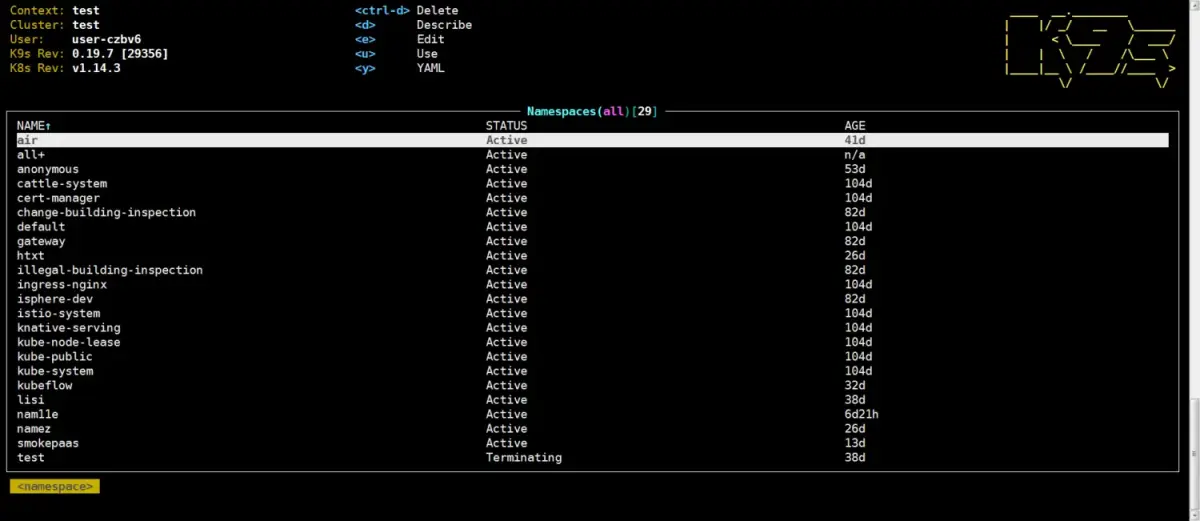
直接命令行输入k9s,会自动用~/.kube/config中当前context的集群。:用于切换资源。如输入:namespace就会切换到namespace视图,输入:deploy会进入deploy视图,输入:context可以切换到不同的集群。/用于查找资源。如namespace视图输入/namespace1用于查找名为namespace1的命名空间,其他资源同理。esc返回上一个视图:q!退出k9s。j/k上下移动。空格选择该资源。enter进入该资源。如在命名空间界面按空格选择一个命名空间,然后按enter查看该命名空间下的pod。tab自动补全。非常强大,使用起来很方便。
其他命令用法可以参考界面提示。如l可以查看pod的日志,d可以describe资源。